
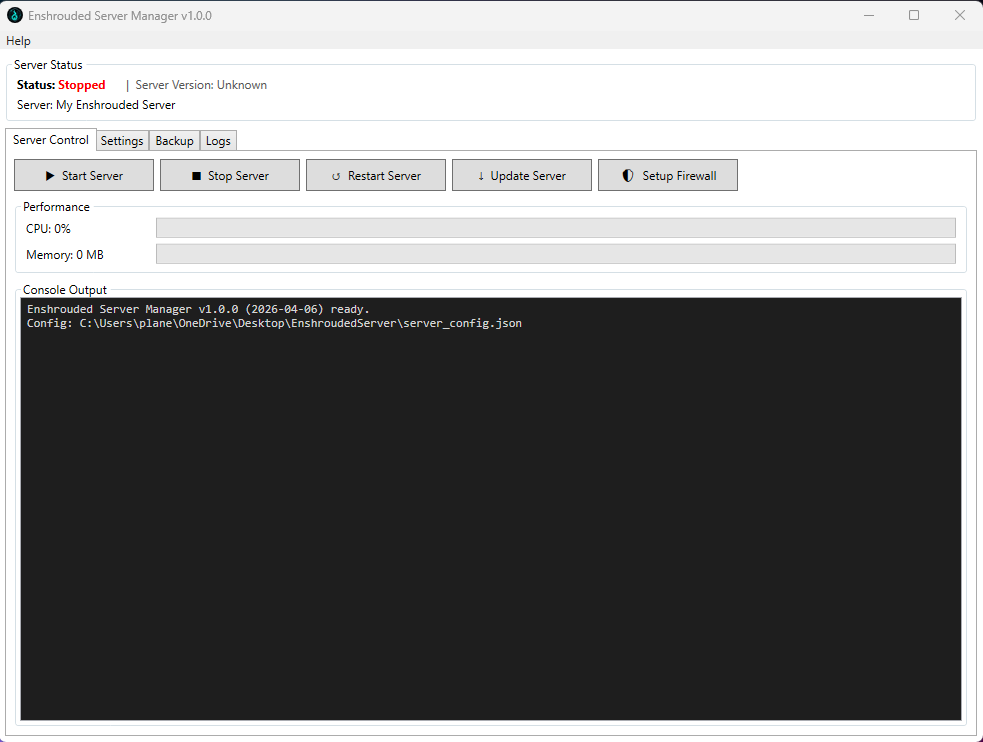
Executable can be found here Releases
A Windows GUI application for managing an Enshrouded dedicated server.
- Windows 10 / 11 / Server 2022 (64-bit)
- .NET 10 Desktop Runtime (x64)
- Download: https://dotnet.microsoft.com/download/dotnet/10.0
- Install the ".NET Desktop Runtime 10.x (x64)" package
- Visual C++ 2015-2022 Redistributable (x64)
- Required by SteamCMD to download/update the server
- Download: https://aka.ms/vs/17/release/vc_redist.x64.exe
- Already present on most Windows 10/11 desktops — commonly missing on Windows Server
dotnet build -c Release
Or publish a small framework-dependent exe:
dotnet publish -c Release -r win-x64 --no-self-contained -o publish/
- Start / Stop / Restart / Update the Enshrouded dedicated server
- Live CPU and memory monitoring
- Auto-backup on a configurable interval with automatic old-backup cleanup
- Auto-restart on a configurable schedule
- Full settings editor (server name, ports, passwords, game rules, difficulty, user groups, tags)
- Difficulty preset selector — grays out individual settings unless set to Custom
- Reset to Defaults button for gameplay settings
- Tooltips on every setting with descriptions and valid ranges
- Server log viewer
- Writes
enshrouded_server.jsonautomatically before each server start - Check for Updates via GitHub releases
- About dialog
On first launch the manager creates an EnshroudedServer\ folder next to the exe:
EnshroudedServerManager.exe
EnshroudedServer\
├── server_config.json      ← manager config (edit here or via Settings tab)
├── server\                 ← enshrouded_server.exe lives here after update
├── steamcmd\               ← SteamCMD downloaded here automatically
├── backups\                ← zip backups stored here
└── logs\                   ← manager log (server_manager.log)
- Run as Administrator for full process control.
- SteamCMD is downloaded automatically on first Update.
- On Windows Server, install the Visual C++ Redistributable before clicking Update. SteamCMD exits with code 8 if it is missing.
- User group passwords cannot be empty — the Enshrouded server exits immediately on startup if any group has a blank password. If you leave a password blank, the manager generates a random one when the server starts (visible in Settings → User Groups).
- The dedicated server takes no command-line arguments; all configuration is written to
enshrouded_server.jsonbefore each start.