When running a virtual machine, you probably lose the ability to play sound through the host PC Speaker, something that can be both, cool and useful. I used to play PC Speaker tones in my Synchronet BBS, HispaMSX BBS, with the SysOP Pagging feature that trigged the playtone binary or playtone.js file to play TON files converted from monophonic MIDI files.
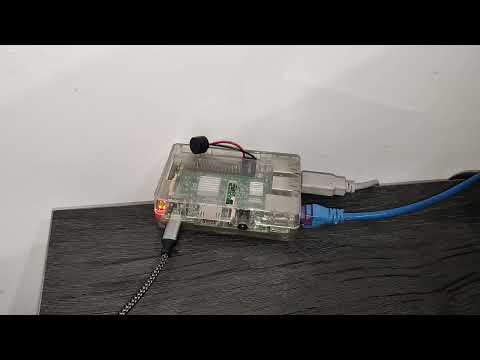
I am restoring this feature via a Raspberry Pi, a PC Speaker connected to PWM enabled GPIO and a small web server coded in Python, so she is able to play tones via HTTP request.
The solution doesn't implement yet the full TON file syntax, but many of them will work. Furthermore, as I was not able to get proper sound quality output with RPi.GPIO Python module, I decided to use WiringPi gpio command line utility.
Following files are part of the solution:
playtone.bash. Bash script that plays frequency based TON files using WiringPigpiocommand line utility.rpi-netplaytone.py. A Python program that brings up a webserver for accepting requests that plays TON files. It calls theplaytone.bashscript.rpi-netplaytone.service. systemd unit file to install the service. Modify this filegpio-pinparameter to match the one you are using in your Raspberry Pi.Makefile. A simple Makefile to install and uninstall the service. It assumes systemd is init.
Please, double-check all parameters and operations for your Raspberry Pi. This software is provided AS IS and I will not take responsability if it causes damage to your PC Speaker, Raspberry Pi board or any other equipment.
The solution is so simple that there is not an actual installation setup:
- Clone this repository.
- Install the needed dependencies:
a. Python 3.9 or higher.
b. WiringPi. This should provide the
gpiocommand line tool. c.perl5,bc,trandawkcommand line tools. - Edit
rpi-netplaytone.serviceand check the gpio pin configuration. - Edit
Makefileand check the operations it performs are ok with your system, speciallysystemdrelated setup. - After everything has been checked, run
sudo make install.
If you used sudo make install, you can uninstall the solution with sudo make uninstall.
This software, except the Synchronet BBS tone files located in the sbbstone, is licensed under MIT License.
Copyright 2023 Carlos Milán Figueredo Permission is hereby granted, free of charge, to any person obtaining a copy of this software and associated documentation files (the "Software"), to deal in the Software without restriction, including without limitation the rights to use, copy, modify, merge, publish, distribute, sublicense, and/or sell copies of the Software, and to permit persons to whom the Software is furnished to do so, subject to the following conditions:
The above copyright notice and this permission notice shall be included in all copies or substantial portions of the Software.
THE SOFTWARE IS PROVIDED "AS IS", WITHOUT WARRANTY OF ANY KIND, EXPRESS OR IMPLIED, INCLUDING BUT NOT LIMITED TO THE WARRANTIES OF MERCHANTABILITY, FITNESS FOR A PARTICULAR PURPOSE AND NONINFRINGEMENT. IN NO EVENT SHALL THE AUTHORS OR COPYRIGHT HOLDERS BE LIABLE FOR ANY CLAIM, DAMAGES OR OTHER LIABILITY, WHETHER IN AN ACTION OF CONTRACT, TORT OR OTHERWISE, ARISING FROM, OUT OF OR IN CONNECTION WITH THE SOFTWARE OR THE USE OR OTHER DEALINGS IN THE SOFTWARE.