

A colorful logger with the ability to log "Processing ... done".
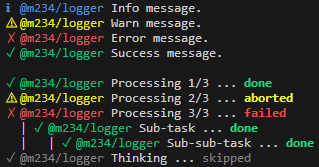
- Interactive Task Tracking: Display ongoing tasks with spinners and status indicators.
- Automatic Console Hooking: Intercepts
console.logand other output to prevent them from breaking the task display. - Cross-Platform: Works seamlessly in both Deno and Node.js.
- Indented Subtasks: Organize complex operations with hierarchical task structures.
- Customizable: Configure prefixes, colors, and duration displays.
Basic logging and formatted output for your application:
import { format, Logger } from "@m234/logger";

const logger = new Logger({ prefix: "MyApp" });

logger.print("Hello, World!");
logger.println("Hello, World!");
logger.print(format("Hello, World! %o", true));

logger.info("This is an informational message.");
logger.warn("This is a warning.");
logger.error("This is an error.");
logger.success("This is a success message.");Track the progress and result of long-running or multi-step operations. Task printing provides visual feedback for ongoing, successful, skipped, failed, or aborted tasks:
import { Logger } from "@m234/logger";

const logger = new Logger({ prefix: "MyApp" });
using task = logger.task({
  text: "Operating",
  disposeState: "completed",
  // defaultTaskOptions: { suffixDuration: false }
}).start();

// Output: - MyApp Operating ...
task.end("completed");
// Output: ✓ MyApp Operating ... done
task.end("skipped");
// Output: ✓ MyApp Operating ... skipped
task.end("failed");
// Output: ✗ MyApp Operating ... failed
task.end("aborted");
// Output: ⚠ MyApp Operating ... abortedAutomate task execution and handle asynchronous operations with task runners. This feature allows you to run a function as a task, automatically updating the task status based on the function's result:
import { Logger } from "@m234/logger";
import { delay } from "jsr:@std/async/delay";

const logger = new Logger({ prefix: "MyApp" });
logger.task({
  text: "Operating",
}).startRunner(async ({ task }) => {
  await delay(1000);
  return "completed";
});You can create hierarchical tasks using the indent option:
const parent = logger.task({ text: "Main operation" }).start();
const subtask = logger.task({ text: "Sub-operation", indent: 1 }).start();

await delay(500);
subtask.end("completed");
parent.end("completed");When tasks are active, the library automatically hooks into console.log,
process.stdout.write, and Deno's output streams. Any output sent through these
methods will be "persisted" above the active tasks, ensuring that the
interactive task display remains at the bottom of the terminal.
| Option | Type | Default | Description |
|---|---|---|---|
prefix |
string |
- | A string to prefix all logging methods. |
disabled |
boolean |
false |
Whether logging is disabled. |
defaultTaskOptions |
DefaultTaskOptions |
- | Default options for all tasks created by this logger. |
| Option | Type | Default | Description |
|---|---|---|---|
text |
string |
- | The text to display for the task. |
state |
TaskState |
"idle" |
Initial state of the task. |
disposeState |
TaskStateEnd |
"completed" |
Final state when the task is disposed. |
indent |
number |
0 |
Indentation level of the task. |
suffixDuration |
boolean | bigint |
false |
Whether to show the task duration. If a bigint is provided, the duration is shown live if it's more than the threshold. |
interactive |
boolean |
true |
Whether the task rendering shouldn't be simplified. |
- scripts/example-ora.ts:
Demonstrates integrating the logger with the
oraspinner for animated task progress, updating the spinner frame in real time and marking the task as completed after a delay. - scripts/example-ora-suffix.ts:
Shows a custom
Taskclass that appends anoraspinner animation as a suffix to the task text, including multiple tasks and subtasks with different completion states. - scripts/example-stress.ts: Runs a stress test by creating and updating the state of 20 tasks in rapid succession, randomly changing their states to simulate heavy usage and concurrent task updates.
- scripts/example-persists.ts:
Uses
console.logandstdout.writewhile there are spinning tasks.