





Unicode Emoji Picker is a custom element (Web Component) that allows you to pick an Emoji from the Unicode Emoji specification.
<unicode-emoji-picker></unicode-emoji-picker>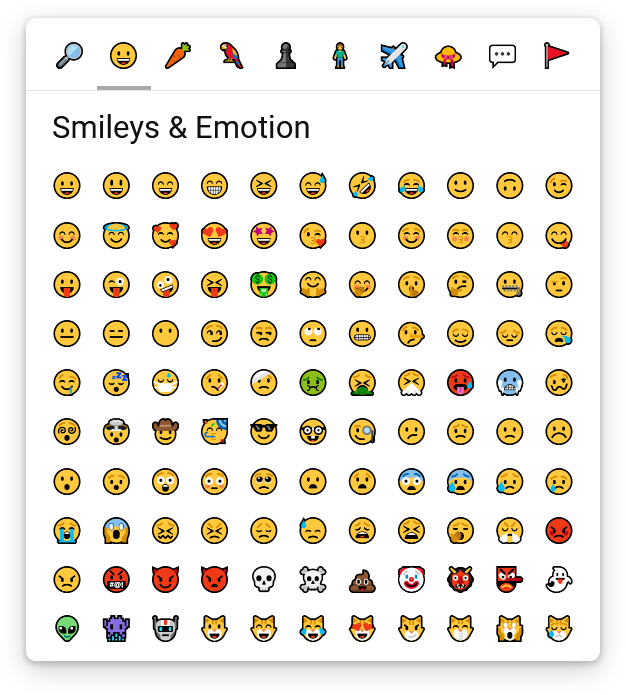
npm install unicode-emoji-pickerThis package is ESM-only. The recommended way to use it is with a bundler (e.g. webpack, esbuild, ...), which handles module resolution for you.
Define the component:
import { defineUnicodeEmojiPicker } from 'unicode-emoji-picker';
defineUnicodeEmojiPicker();
Then use it in your HTML:
<unicode-emoji-picker></unicode-emoji-picker>Because unicode-emoji-picker depends on the following packages:
scrollable-componentfor custom scrollbarsunicode-emojifor raw emoji data
You'll need to expose the following files so they are accessible from the web:
/node_modules/scrollable-component/index.js/node_modules/unicode-emoji/index.js/node_modules/unicode-emoji-picker/index.js
And use an Import Map before importing the component from a module script:
<script type="importmap">
  {
    "imports": {
      "scrollable-component": "/node_modules/scrollable-component/index.js",
      "unicode-emoji": "/node_modules/unicode-emoji/index.js",
      "unicode-emoji-picker": "/node_modules/unicode-emoji-picker/index.js"
    }
  }
</script>

<script type="module">
  import { defineUnicodeEmojiPicker } from 'unicode-emoji-picker';
  defineUnicodeEmojiPicker();
</script>
Then use the component in your HTML:
<unicode-emoji-picker></unicode-emoji-picker>You can choose the version of the Unicode Emoji specification to use by setting the version attribute to one of these values:
0.6,0.7,1.0,2.0,3.0,4.0,5.011.0,12.0,12.1,13.0,13.1,14.015.0,15.1,16.0,17.0
It defaults to 12.0 because newer versions are not supported on Windows 10.
<unicode-emoji-picker version="17.0"></unicode-emoji-picker>You can choose which tab will be selected by default by setting the default-tab attribute to one of these values:
searchface-emotion(this is the default value)food-drinkanimals-natureactivities-eventsperson-peopletravel-placesobjectssymbolsflags
<unicode-emoji-picker default-tab="search"></unicode-emoji-picker>You can move the tabs bar on every side of the component by setting the tabs-position attribute to one of these values:
top(this is the default value)bottomleftright
<unicode-emoji-picker tabs-position="bottom"></unicode-emoji-picker>You can disable the variations panel by setting the disable-variations attribute to true:
<unicode-emoji-picker disable-variations="true"></unicode-emoji-picker>When variations are disabled, users won't be able to choose their emoji's skin tone or hairstyle, but they'll save one click when selecting an emoji that would otherwise require choosing a variation.
If you don't like the default <unicode-emoji-picker> tag, you can override it by calling window.customElements.define() instead of calling defineUnicodeEmojiPicker():
import { EmojiPickerElement } from 'unicode-emoji-picker';
window.customElements.define('my-custom-tag', EmojiPickerElement);
And then use it like this:
<my-custom-tag>
  <!-- Your content -->
</my-custom-tag>You can use the component's API after the custom <unicode-emoji-picker> element has been defined.
import { defineUnicodeEmojiPicker, whenUnicodeEmojiPickerDefined } from 'unicode-emoji-picker';

defineUnicodeEmojiPicker();

whenUnicodeEmojiPickerDefined().then(() => {
  const emojiPicker = document.querySelector('unicode-emoji-picker');
  // do something
});To retrieve the emoji picked by the user, you can add an event listener:
emojiPicker.addEventListener('emoji-pick', (event) => {
  console.log(event.detail.emoji);
});emojiPicker.selectTab('animals-nature');Only works when the search tab is selected.
emojiPicker.searchEmoji('love face');Only works when the search tab is selected.
emojiPicker.clearSearch();emojiPicker.focusHeader();emojiPicker.focusContent();- If you are on the
searchtab, it will focus the search input - If you are not on the
searchtab, it will focus the first emoji
If you always want to focus the first emoji, no matter the selected tab, you can use focusContent(true).
You can translate the labels (or change them to whatever you want) using the setTranslation() method after the custom <unicode-emoji-picker> element has been defined:
whenUnicodeEmojiPickerDefined().then(() => {
  emojiPicker.setTranslation({
    'search': {
      emoji: '🔎',
      title: 'Search an Emoji',
      inputPlaceholder: 'Search an Emoji...',
    },
    'face-emotion': {
      emoji: '😀',
      title: 'Smileys & Emotion',
    },
    'food-drink': {
      emoji: '🥕',
      title: 'Food & Drink',
    },
    'animals-nature': {
      emoji: '🦜',
      title: 'Nature & Animals',
    },
    'activities-events': {
      emoji: '♟️',
      title: 'Activities & Events',
    },
    'person-people': {
      emoji: '🧍',
      title: 'People',
    },
    'travel-places': {
      emoji: '✈️',
      title: 'Travel & Places',
    },
    'objects': {
      emoji: '👒',
      title: 'Clothing & Objects',
    },
    'symbols': {
      emoji: '💬',
      title: 'Symbols',
    },
    'flags': {
      emoji: '🚩',
      title: 'Flags',
    },
  });
});
Unfortunately, you cannot translate emoji descriptions or keywords yet.
You can change the look & feel of the Unicode Emoji Picker using CSS.
Although you can fully customize every part of the component using plain CSS, it may sometimes be easier to override the provided CSS properties first.
The Unicode Emoji Picker component is built using the "em" unit, so everything is scaled up from the font-size.
If you want to resize the component, you should override the font-size first (it also directly reflects the font-size for the emoji font).
unicode-emoji-picker {
  font-size: 24px;
}If you need more control over the density of the component and the font-size isn't precise enough for you, then you can override the following properties:
unicode-emoji-picker {
  /* tabs */
  --tabs-border-width: 1px;
  --tabs-padding: 0.5em;
  --tabs-gap: 0.2em;
  --tab-size: 2em;

  /* title bar */
  --title-bar-height: 3em;
  --title-bar-padding: 1.1em;

  /* emoji grid */
  --emojis-padding: 0.8em;
  --emojis-gap: 0.2em;
  --emoji-size: 1.85em;
  --min-emoji-col-count: 6;
  --max-emoji-col-count: 11;
  --min-emoji-row-count: 4;
  --max-emoji-row-count: 10;
}
You shouldn't go below 6 for --min-emoji-col-count, otherwise it can break the variations panel.
You shouldn't go below 4 for --min-emoji-row-count, otherwise it will make the component hard to use.
You can fully change the color scheme of the component by overriding the following properties:
unicode-emoji-picker {
  /* global */
  --fill-color: #fff;
  --text-color: #111;

  /* tabs */
  --tabs-border-color: #e4e4e4;
  --tab-fill-color-hover: #e9e9e9;
  --tab-active-marker-color: #aaa;

  /* content scrollbar */
  --content-scrollbar-thumb-fill-color: #d7d7d7;
  --content-scrollbar-thumb-fill-color-hover: #aaa;

  /* title bar */
  --title-bar-fill-color: color-mix(in srgb, var(--fill-color), transparent 20%);
  --search-input-border-color: #e4e4e4;
  --search-input-border-color-hover: #222;

  /* emojis */
  --emoji-border-color-hover: #d7d7d7;
  --emoji-variation-marker-color: #d7d7d7;
  --emoji-variation-marker-color-hover: #aaa;

  /* variations panel */
  --variations-backdrop-fill-color: color-mix(in srgb, var(--fill-color), transparent 30%);
  --variations-fill-color: var(--fill-color);
}You can choose the emoji fonts of your choice (e.g. OpenMoji, Noto Color Emoji, ...) by overriding the following property:
unicode-emoji-picker {
  --emoji-font-family: apple color emoji, segoe ui emoji, noto color emoji, android emoji, emojisymbols, emojione mozilla, twemoji mozilla, segoe ui symbol;
}
Here is an example with the OpenMoji font:
<style>
  @font-face {
    font-family: "OpenMoji";
    src: url("https://cdn.jsdelivr.net/gh/hfg-gmuend/openmoji/font/OpenMoji-color-glyf_colr_0/OpenMoji-color-glyf_colr_0.woff2") format("woff2");
    unicode-range: U+23,U+2A,U+2D,U+30-39,U+A9,U+AE,U+200D,U+203C,U+2049,U+20E3,U+2117,U+2120,U+2122,U+2139,U+2194-2199,U+21A9,U+21AA,U+229C,U+231A,U+231B,U+2328,U+23CF,U+23E9-23F3,U+23F8-23FE,U+24C2,U+25A1,U+25AA-25AE,U+25B6,U+25C0,U+25C9,U+25D0,U+25D1,U+25E7-25EA,U+25ED,U+25EE,U+25FB-25FE,U+2600-2605,U+260E,U+2611,U+2614,U+2615,U+2618,U+261D,U+2620,U+2622,U+2623,U+2626,U+262A,U+262E,U+262F,U+2638-263A,U+2640,U+2642,U+2648-2653,U+265F,U+2660,U+2663,U+2665,U+2666,U+2668,U+267B,U+267E,U+267F,U+2691-2697,U+2699,U+269B,U+269C,U+26A0,U+26A1,U+26A7,U+26AA,U+26AB,U+26B0,U+26B1,U+26BD,U+26BE,U+26C4,U+26C5,U+26C8,U+26CE,U+26CF,U+26D1,U+26D3,U+26D4,U+26E9,U+26EA,U+26F0-26F5,U+26F7-26FA,U+26FD,U+2702,U+2705,U+2708-270D,U+270F,U+2712,U+2714,U+2716,U+271D,U+2721,U+2728,U+2733,U+2734,U+2744,U+2747,U+274C,U+274E,U+2753-2755,U+2757,U+2763,U+2764,U+2795-2797,U+27A1,U+27B0,U+27BF,U+2934,U+2935,U+2B05-2B07,U+2B0C,U+2B0D,U+2B1B,U+2B1C,U+2B1F-2B24,U+2B2E,U+2B2F,U+2B50,U+2B55,U+2B58,U+2B8F,U+2BBA-2BBC,U+2BC3,U+2BC4,U+2BEA,U+2BEB,U+3030,U+303D,U+3297,U+3299,U+E000-E009,U+E010,U+E011,U+E040-E06D,U+E080-E0B4,U+E0C0-E0CC,U+E0FF-E10D,U+E140-E14A,U+E150-E157,U+E181-E189,U+E1C0-E1C4,U+E1C6-E1D9,U+E200-E216,U+E240-E269,U+E280-E283,U+E2C0-E2C4,U+E2C6-E2DA,U+E300-E303,U+E305-E30F,U+E312-E316,U+E318-E322,U+E324-E329,U+E32B,U+E340-E348,U+E380,U+E381,U+F000,U+F77A,U+F8FF,U+FE0F,U+1F004,U+1F0CF,U+1F10D-1F10F,U+1F12F,U+1F16D-1F171,U+1F17E,U+1F17F,U+1F18E,U+1F191-1F19A,U+1F1E6-1F1FF,U+1F201,U+1F202,U+1F21A,U+1F22F,U+1F232-1F23A,U+1F250,U+1F251,U+1F260-1F265,U+1F300-1F321,U+1F324-1F393,U+1F396,U+1F397,U+1F399-1F39B,U+1F39E-1F3F0,U+1F3F3-1F3F5,U+1F3F7-1F4FD,U+1F4FF-1F53D,U+1F549-1F54E,U+1F550-1F567,U+1F56F,U+1F570,U+1F573-1F57A,U+1F587,U+1F58A-1F58D,U+1F590,U+1F595,U+1F596,U+1F5A4,U+1F5A5,U+1F5A8,U+1F5B1,U+1F5B2,U+1F5BC,U+1F5C2-1F5C4,U+1F5D1-1F5D3,U+1F5DC-1F5DE,U+1F5E1,U+1F5E3,U+1F5E8,U+1F5EF,U+1F5F3,U+1F5FA-1F64F,U+1F680-1F6C5,U+1F6CB-1F6D2,U+1F6D5-1F6D7,U+1F6DC-1F6E5,U+1F6E9,U+1F6EB,U+1F6EC,U+1F6F0,U+1F6F3-1F6FC,U+1F7E0-1F7EB,U+1F7F0,U+1F90C-1F93A,U+1F93C-1F945,U+1F947-1F9FF,U+1FA70-1FA7C,U+1FA80-1FA89,U+1FA8F-1FAC6,U+1FACE-1FADC,U+1FADF-1FAE9,U+1FAF0-1FAF8,U+1FBC5-1FBC9,U+E0061-E0067,U+E0069,U+E006C-E0079,U+E007F;
  }

  unicode-emoji-picker {
    --emoji-font-family: "OpenMoji";
  }
</style>You can change the CSS transitions globally by overriding the following property:
unicode-emoji-picker {
  --transition: 150ms cubic-bezier(0, 0, 0.2, 0.1);
}If you need more control over the look of each part of the component, you can use CSS ::part() selectors to directly target the elements you want, and then use plain CSS to fully customize it.
Unicode Emoji Picker exposes the following part selectors:
::part(tabs-wrapper)to target the tabs wrapper::part(tabs)to target the tabs container::part(tab-wrapper)to target the wrappers of each tab::part(tab-wrapper active)to target the wrapper of the active tab::part(tab-wrapper active):afterto target the bottom marker for active tab::part(tab)to target each tab::part(tab active)to target the active tab
::part(content)to target the content::part(title-bar)to target the sticky title bar::part(title)to target the title::part(search-input)to target the search input::part(emojis-wrapper)to target the wrapper for the emojis grid::part(emojis)to target the the emojis grid
::part(emoji)to target each emoji (this includes both the base & variation emojis)::part(emoji base)to target each base emoji::part(emoji with-variations)to target each emoji that has a variations panel::part(emoji with-variations):afterto target each emoji variation marker::part(emoji variation)to target each variation emoji within a variations panel::part(emoji active)to target the active emoji (when its variations panel is opened)
::part(variations)to target the variations panel of the active emoji::part(backdrop)to target the overlay shown behind the opened variations panel
::part(scrollbar)to target the content's scrollbar::part(scrollbar-track)to target the scrollbar track::part(scrollbar-thumb)to target the scrollbar thumb::part(scrollbar-thumb active)to target the scrollbar thumb when the user is actively using it
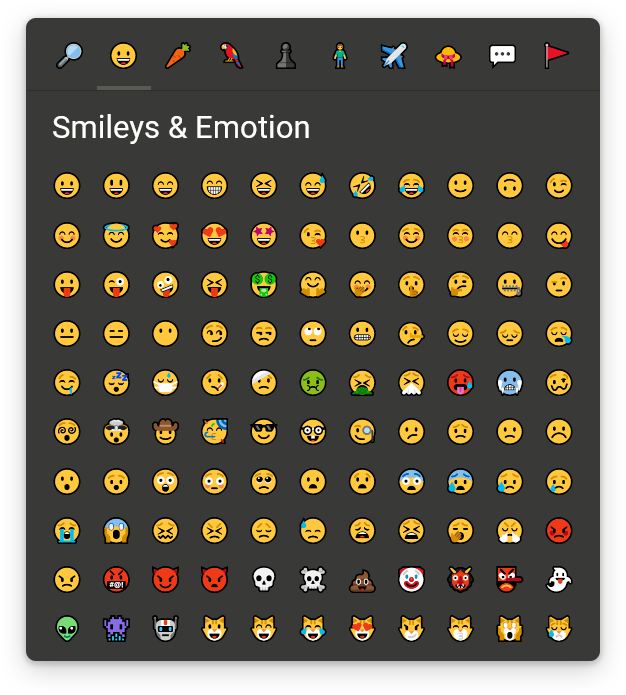
unicode-emoji-picker {
  --fill-color: #393938;
  --text-color: #fffffc;
  --tabs-border-color: #30302a;
  --tab-fill-color-hover: #454540;
  --content-scrollbar-thumb-fill-color: #50504a;
  --content-scrollbar-thumb-fill-color-hover: #76766f;
  --tab-active-marker-color: #595955;
  --title-bar-fill-color: color-mix(in srgb, var(--fill-color), transparent 12%);
  --search-input-border-color: #50504a;
  --search-input-border-color-hover: #eee;
  --emoji-border-color-hover: #595955;
  --variations-backdrop-fill-color: color-mix(in srgb, var(--fill-color), transparent 20%);
  --emoji-variation-marker-color: #50504a;
  --emoji-variation-marker-color-hover: #76766f;
}
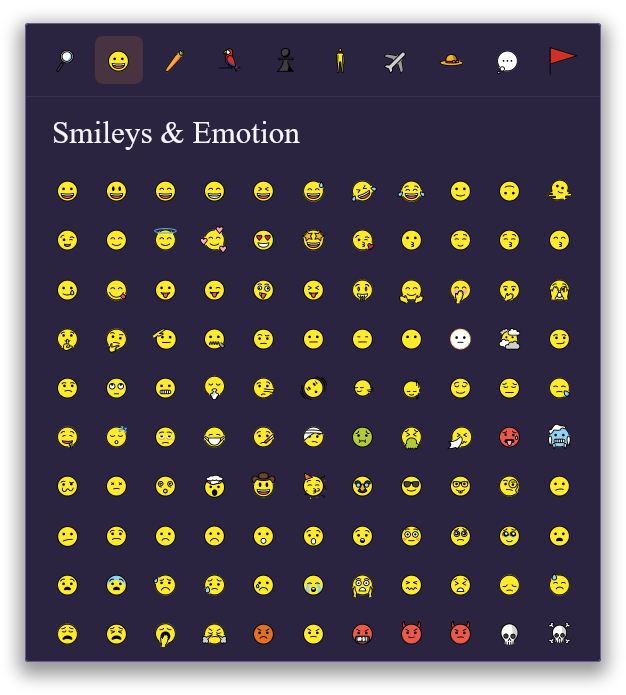
unicode-emoji-picker {
  --emoji-font-family: "OpenMoji";
  --fill-color: #2b2440;
  --text-color: #f7f4ff;
  --tabs-border-color: #3b3058;
  --tab-fill-color-hover: #46356b;
  --title-bar-fill-color: color-mix(in srgb, var(--fill-color), transparent 25%);
  --search-input-border-color: #6b5b95;
  --search-input-border-color-hover: #ffb454;
  --variations-backdrop-fill-color: color-mix(in srgb, var(--fill-color), transparent 35%);
  --emoji-variation-marker-color: #6b5b95;
  --emoji-variation-marker-color-hover: #ffb454;
  box-shadow: 0 10px 35px rgba(0, 0, 0, 0.45);
  border-radius: 3px;
  outline: 1px solid #6b5b95;
  transition: outline var(--transition);
  font-family: 'Times New Roman', Times, serif;
}
unicode-emoji-picker:focus-within {
  outline: 1px solid #ffb454;
}
unicode-emoji-picker::part(tab-wrapper active):after {
  display: none;
}
unicode-emoji-picker::part(tab active) {
  background-color: #ff9f4322;
}
unicode-emoji-picker::part(tab active):hover,
unicode-emoji-picker::part(tab active):focus-visible {
  background-color: #ff9f4366;
}
unicode-emoji-picker::part(search-input) {
  padding: 0.35em 0.8em;
  border-width: 1px;
  border-radius: 3px;
}
unicode-emoji-picker::part(emoji) {
  border-radius: 3px;
}
unicode-emoji-picker::part(emoji with-variations):after {
  border-bottom-right-radius: 3px;
  border-width: 3px;
}
unicode-emoji-picker::part(emoji active),
unicode-emoji-picker::part(emoji):hover,
unicode-emoji-picker::part(emoji):focus-visible {
  border: 0 none;
  background-color: #ff9f4322;
}
unicode-emoji-picker::part(variations) {
  border-radius: 3px;
  outline: 1px solid #6b5b95;
  transition: outline var(--transition);
  box-shadow: 0 10px 15px rgba(0, 0, 0, 0.45);
}
unicode-emoji-picker::part(variations):focus-within {
  outline: 1px solid #ffb454;
}
unicode-emoji-picker::part(backdrop) {
  backdrop-filter: blur(4px);
}
unicode-emoji-picker::part(scrollbar-thumb) {
  background: linear-gradient(130deg, #56356b, #862c44, #ee9248);
  transition: filter 150ms ease-out;
}
unicode-emoji-picker::part(scrollbar-thumb):hover {
  filter: brightness(1.6) saturate(1.6);
}
Every modern browser that supports the following features:
- shadow dom
- custom elements
- javascript resize observer
- javascript private class fields
- css sticky position
- css scrollbar width
- css custom properties
- css part selector
So, basically, all up-to-date browsers since 2025.