Google provides comprehensive Android Design Guidelines here:
http://developer.android.com/design/index.html
Take an hour or two to read through the entire documentation.
This document is meant to highlight the essentials.
One of the greatest challenges of designing for Android is supporting all of the different device sizes and screen densities. Because of this, Redlines should be expressed in dp(Density-pixels) instead of pixels. Read the "Must reads" below for more info on this.
Must reads:
Iconography
Metrics & Grids
Device Fragmentation
Asset Sizing Guide:
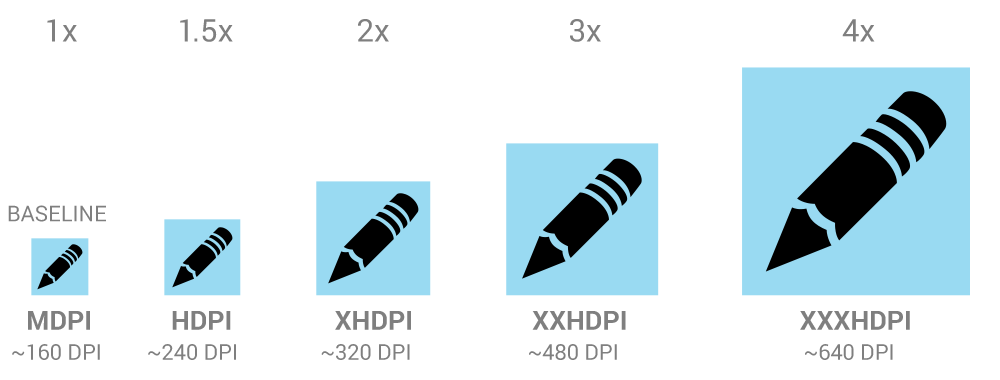
Ideally, any revisions of assets are delivered as a complete package in a .zip folder called "res.zip". In order to support all screen densities, we need to provide 6 different sizes of each asset. For example, say we have an asset called "my_launcher.png". Android requires that we place the assets in a specific folder structure as follows:
res/
drawable-mdpi/my_launcher.png
drawable-tvdpi/my_launcher.png
drawable-hdpi/my_launcher.png
drawable-xhdpi/my_launcher.png
drawable-xxhdpi/my_launcher.png
drawable-xxxhdpi/my_launcher.png
Other file naming rules:
- No spaces allowed in file names
- No capital letters allowed
- No special characters other than underscores allowed
- File names may not begin with numbers
Example suggested file names (view_specificasset_state):
videoplayer_playbtn_normal.png
videoplayer_playbtn_pressed.png
videoplayer_playbtn_focused.png
videoplayer_playbtn_disabled.png
videoplayer_playbtn_disabled_focused.png
- Use .jpg for full-screen backgrounds that do not contain transparency.
- Use 9-Patch images for backgrounds that need to scale. Some good resources: